사전 설치
1. Docker
2. Pycharm
3. aws access key
Dokcer 설정
이미지 다운로드
docker pull amazon/aws-glue-libs:glue_libs_4.0.0_image_01
컨테이너 실행
# -e DISABLE_SSL=true : SSL을 사용하지 않도록 설정
# /home/glue_user/jupyter/jupyter_start.sh : 생성과 동시에 노트북 실행

# 실행 - Mac/Linux
docker run -itd \
    -p 8888:8888 -p 4040:4040 \
    -v ~/.aws:/root/.aws:ro \
    -e DISABLE_SSL=true \
    -e AWS_REGION=ap-northeast-2 \
    -e AWS_ACCESS_KEY_ID=myAccessKey \
    -e AWS_SECRET_ACCESS_KEY=mySecretAccessKey \
    --name glue_jupyter \
    amazon/aws-glue-libs:glue_libs_4.0.0_image_01 \
    /home/glue_user/jupyter/jupyter_start.sh


# 실행 - Windows
docker run -itd \
    -p 8888:8888 -p 4040:4040 \
    -v c://user_path//.aws:/root/.aws:rw \
    -e DISABLE_SSL=true \
    -e AWS_REGION=ap-northeast-2 \
    -e AWS_ACCESS_KEY_ID=myAccessKey \
    -e AWS_SECRET_ACCESS_KEY=mySecretAccessKey \
    --name glue_jupyter \
    amazon/aws-glue-libs:glue_libs_4.0.0_image_01 \
    /home/glue_user/jupyter/jupyter_start.sh


* 제플린이라면
: 8888:8888 -> 8080:8080
: /home/jupyter/jupyter_start.sh -> /home/zeppelin/bin/zeppelin.sh
컨테이너 확인
아래 이미지와 같이 해당 container 생성 확인
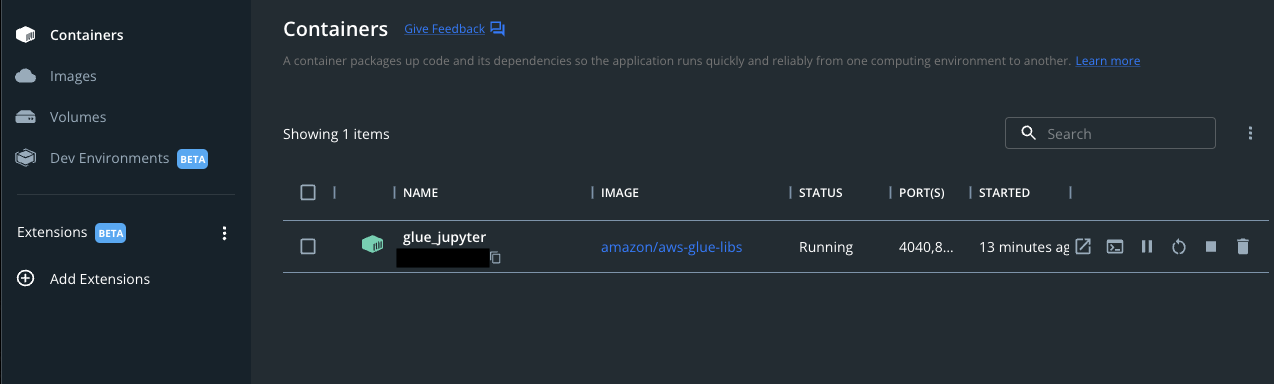
Notebook 실행
Notebook 접속
http://localhost:8080 접속
노트북이 실행 안되었다면 아래 커맨드 실행
docker exec -it glue_jupyter bash
Sample Code
Pyspark notebook 생성 후 샘플 코드 실행
from pyspark.sql import SparkSession
from awsglue.context import GlueContext
from awsglue.job import Job

# SparkSession은 이미 초기화 되어있어 바로 사용가능 <class 'pyspark.sql.session.SparkSession'>
glueContext = GlueContext(spark.sparkContext)
logger = glueContext.get_logger()

# aws계정의 테이블 확인
spark.sql("show databases").show()
참조
docker image hub : https://hub.docker.com/r/amazon/aws-glue-libs/tags
aws document : https://docs.aws.amazon.com/glue/latest/dg/aws-glue-programming-etl-libraries.html
glue git code : https://github.com/awslabs/aws-glue-libs
install reference : https://aws.amazon.com/ko/blogs/big-data/developing-aws-glue-etl-jobs-locally-using-a-container/
'Platform > AWS' 카테고리의 다른 글
| AWS - S3 수명주기 관리 (0) | 2023.03.26 |
|---|---|
| AWS - Organization 시작하기 (0) | 2023.03.26 |
| AWS - SAM을 통한 Lambda [3]Layer with Pycharm (0) | 2023.03.26 |
| AWS - SAM을 통한 Lambda [2]Local Debugging (0) | 2023.03.26 |
| AWS - SAM을 통한 Lambda [1]Pycharm 환경 셋팅 (0) | 2023.03.26 |